 XSTRAP STANDARD 2″ Hitch Reducer Sleeve Carbon Steel
Code
Updated Friday, October 30, 2026 · 7 deals · newest first. Tap a code to copy it, then open the deal for how to apply it.
Adapter is a broad label, and this hub reflects that. The adapter deals collected here range from USB-A to USB-C plugs and docking stations for extra monitors to smartwatch charging adapters, magnetic phone tripod mounts, trailer hitch reducer sleeves and golf cart charging inlets. What ties them together is that each one connects two things that would not otherwise fit.
That makes compatibility the whole game. Check the exact connector, size or device named in the title against what you own, and read the description for supported models. A few listings carry seller codes; add yours at checkout and review the total before you buy.
XSTRAP STANDARD 2″ Hitch Reducer Sleeve Carbon Steel
 DS18 Pair of 6×9 to 6.5″ Speaker
 WAVLINK BE6500 USB WiFi 7 Adapter
 TFFUAM Golf Cart Charging Port Adapter
 Aeroliteㅤ USB C Charging Adapter Compatible
 EMEET USB C Adapter Kit 3-Pack
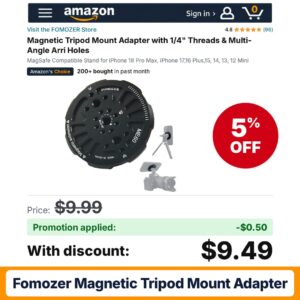 FOMOZER Magnetic Tripod Mount Adapter
Hand-picked YouTube reviews and buying guides for adapter – watch before you pick a deal.

The BEST USB-C wall chargers: OVER 20 adapters TESTED! (best value, travel, desktop, more!) – by Android Authority on YouTube. We are not affiliated with the channel.

Anker Nano Travel Adapter Review (Universal 5-Port 20W Adapter) – One Bag Travels

Anker Nano Travel Adapter Review (1 Month of Use) – Pack Hacker Reviews
An adapter only works if both ends match what you have. The first step is to name the two things you are connecting: a USB-A cable and a USB-C laptop, a laptop and two monitors, a phone and a camera tripod, or a receiver hitch and a smaller drawbar. Write down the exact connector, size or model on each side before you open a single listing. Most returns in this category come from a mismatch that a quick check would have caught.
Small plug-style adapters convert between USB-A and USB-C, often sold in multi-packs, such as the EMEET kits. Device-specific charging adapters let a standard USB-C cable charge a smartwatch that normally needs its own cable.
USB-C docks, such as the Selore models here, add HDMI outputs and extra ports so one laptop cable can drive multiple monitors and accessories. These are the most spec-heavy adapters on the page.
Magnetic tripod mounts, like the FOMOZER style, attach to a MagSafe-compatible phone and provide a standard quarter-inch thread for tripods, plus extra mounting holes for rigs.
Hitch reducer sleeves let a smaller drawbar fit a larger receiver, and golf cart charging port adapters replace or convert a cart's charging inlet. These depend on exact sizing and model fit.
| Type | Best for | What to check |
|---|---|---|
| USB-A or USB-C plug adapter | Using older cables with newer devices | Direction of conversion, data or charge only |
| Device charging adapter | Charging a watch with a common cable | Exact watch models listed |
| USB-C dock or display hub | Multi-monitor desk setups | Laptop port support, number of displays |
| Magnetic tripod mount | Filming and photos with a phone | Phone model, MagSafe compatibility |
| Hitch or golf cart adapter | Towing, cart charging | Receiver size, cart make and model |
For USB adapters, keep the small plugs in a pouch or attached to a cable so they do not go missing, and avoid bending a cable at the adapter joint. For docks, plug the dock into power first if it supports pass-through charging, connect monitors next, then attach the laptop; update your display settings afterward. For magnetic tripod mounts, wipe the phone back and the mount face before attaching so the hold is even. For hitch and golf cart adapters, follow the manufacturer's installation instructions, check fit before each use and store metal parts somewhere dry.
Small USB adapters are easy to lose, so multi-packs often make more sense than single pieces. A kit with adapters in both directions covers most desk, car and travel situations at once. When comparing deals, divide the total by the number of pieces in the pack rather than looking at the headline price alone. For docks and hubs, compare by the ports you will actually use: two HDMI outputs matter only if you have two monitors, and extra USB ports only help if you have devices to plug in. Paying for features you will never use is the quiet way a good deal turns into a poor one.
Tech adapters and docks get broad discounts during Prime Day in July, Prime Big Deal Days in October and Black Friday through Cyber Monday. Back-to-school season is a good window for USB adapters and laptop docks. Vehicle and outdoor adapters are less tied to tech events, but the same Amazon sales usually include them, and post-holiday clearance in January catches leftover stock.
A handful of adapter listings carry seller promo codes; many more show a clip coupon or a simple price cut. Clip any coupon on the product page, add the item, then enter any code at checkout in the promo field. Codes and coupons combine only when the seller allows it. Subscribe & Save does not usually apply to adapters. To confirm the real total, open the order summary and look for each discount line before you place the order.
The first lets a USB-A cable or device connect to a USB-C port; the second does the reverse. Check which end plugs into your device and which end accepts your cable, and use the listing photos to confirm both sides before ordering.
It depends on what your laptop's USB-C port supports. Read the seller's compatibility notes for your operating system and laptop, and look for any limits on extended versus mirrored displays. If the listing names supported models, confirm yours is included.
Some do. A small share of adapter listings on this hub carry seller codes, while most savings come from clip coupons or price drops. Enter any code at checkout and check the order summary to confirm it applied.
Measure the inside of your receiver opening and the size of the drawbar or accessory you want to use. Match both numbers to the listing title and description, and follow the manufacturer's instructions for installation and use.
It needs a phone with built-in magnets or a magnetic case. Listings usually name the phone models they support and mention MagSafe compatibility. Check your exact model, and clean the phone back before attaching for an even hold.
As an Amazon Associate, AmazonHaul earns from qualifying purchases. Promo codes and coupons are set by sellers, can sell out or end early, and the final price is always the one shown in your Amazon cart.
AmazonHaul Guide is an independent deals guide run by an Amazon Associate – not Amazon. Every promo code and price drop is checked before it goes live.